
Utangulizi
This manual provides essential instructions for the safe and efficient operation of your Fever GA-10 10-Watt Guitar Combo Ampmsafishaji. Tafadhali soma mwongozo huu vizuri kabla ya kutumia amplifier to ensure proper setup, operation, and maintenance. Retain this manual for future reference.

Kielelezo cha 1: Mbele view of the Fever GA-10 amplifier, showcasing muundo wake wa kompakt na jopo la kudhibiti.
Maagizo Muhimu ya Usalama
- Soma maagizo haya.
- Weka maagizo haya.
- Zingatia maonyo yote.
- Fuata maagizo yote.
- Usitumie kifaa hiki karibu na maji.
- Safisha tu kwa kitambaa kavu.
- Usizuie fursa yoyote ya uingizaji hewa. Sakinisha kwa mujibu wa maelekezo ya mtengenezaji.
- Usisakinishe karibu na vyanzo vyovyote vya joto kama vile radiators, rejista za joto, jiko, au vifaa vingine (pamoja na amplifiers) zinazotoa joto.
- Linda waya wa umeme dhidi ya kutembezwa au kubanwa, haswa kwenye plagi, vyombo vya kuhifadhia umeme, na mahali zinapotoka kwenye kifaa.
- Tumia viambatisho/vifaa vilivyobainishwa na mtengenezaji pekee.
- Chomoa kifaa hiki wakati wa dhoruba za umeme au kisipotumika kwa muda mrefu.
- Rejelea huduma zote kwa wahudumu waliohitimu. Huduma inahitajika wakati kifaa kimeharibiwa kwa njia yoyote, kama vile kamba ya usambazaji wa umeme au plagi imeharibiwa, kioevu kimemwagika au vitu vimeanguka kwenye kifaa, kifaa kimeathiriwa na mvua au unyevu, haifanyi kazi kawaida. , au imetupwa.
Sanidi
1. Kufungua
Ondoa kwa uangalifu faili ya amplifier from its packaging. Inspect the unit for any signs of damage that may have occurred during shipping. If damage is found, contact your retailer immediately.
2. Uunganisho wa Nguvu
Hakikisha amplifier's power switch is in the "OFF" position. Connect the included power cord to the power input on the rear of the amplifier and then to a suitable electrical outlet. The amplifier operates on standard AC power.
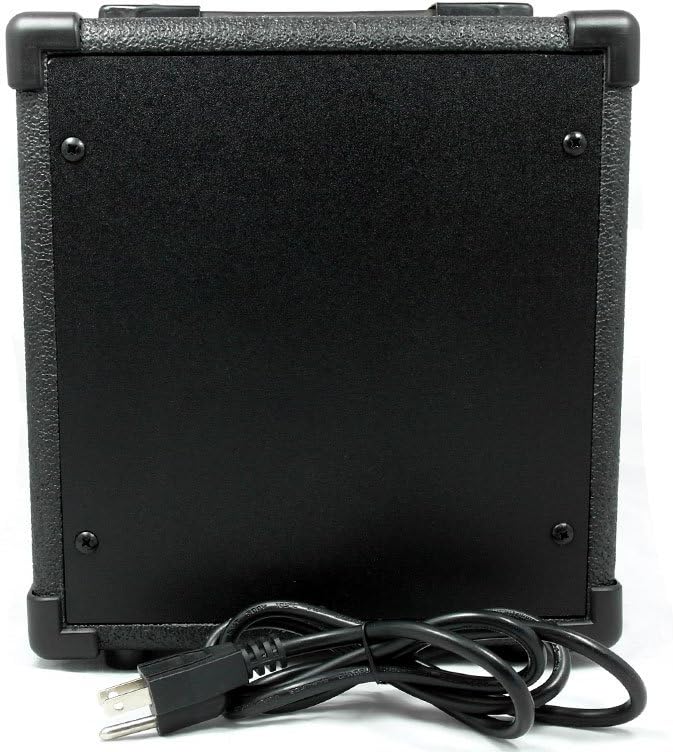
Kielelezo cha 2: Nyuma view of the Fever GA-10 amplifier, showing the power cord connection point.
3. Muunganisho wa Ala
Unganisha gitaa lako au ala nyingine ya muziki kwenye PEMBEJEO jack on the front panel using a standard 1/4-inch instrument cable.
Maagizo ya Uendeshaji
Familiarize yourself with the controls on the front panel before powering on the ampmaisha zaidi.

Kielelezo cha 3: Kina view of the Fever GA-10 amppaneli ya kudhibiti ya lifier.
Majukumu ya Paneli ya Kudhibiti:
- Pembejeo: 1/4-inch jack for connecting your instrument.
- PATA: Inadhibiti kiasi cha kablaamplification and distortion. Higher settings increase saturation.
- OVERDRIVE DISTORTION SWITCH: Toggles between clean and overdriven/distorted tones. Engage for a heavier sound.
- MUHIMU: Hurekebisha kiwango cha jumla cha matokeo ya ampmaisha zaidi.
- TONE: Maumbo ya amplifier's frequency response, from darker (lower settings) to brighter (higher settings).
- SIMU: 1/4-inch stereo jack for connecting headphones for silent practice. Connecting headphones will mute the ampspika ya lifier.
- SWITCH YA NGUVU: Inageuka amplifier ON or OFF. The indicator light illuminates when the amplifier imewashwa.
Operesheni ya Msingi:
- Ensure all volume and gain controls are set to their minimum positions before powering on.
- Unganisha chombo chako kwa PEMBEJEO jack.
- Geuza SWITCH YA NGUVU to the "ON" position. The power indicator light will illuminate.
- Punguza polepole JUZUU udhibiti hadi kiwango chako cha kusikiliza unachotaka.
- Rekebisha KUPATA control to achieve the desired amount of pre-amplification. For clean tones, keep gain lower.
- Tumia OVERDRIVE DISTORTION SWITCH to engage or disengage the distortion effect.
- Fine-tune your sound using the TONE kudhibiti.
- Kwa mazoezi ya kibinafsi, unganisha vipokea sauti vya masikioni kwenye SIMU jack.
- When finished, turn the JUZUU down, then switch the SWITCH YA NGUVU to "OFF".
Matengenezo
Kusafisha:
Ili kusafisha amplifier, use a soft, dry cloth. Do not use liquid cleaners or abrasive materials, as these can damage the finish and internal components. Ensure the amplifier is unplugged before cleaning.
Hifadhi:
Hifadhi ya amplifier in a cool, dry place away from direct sunlight, extreme temperatures, and high humidity. Avoid placing heavy objects on top of the ampmaisha zaidi.
Kutatua matatizo
- Hakuna Sauti:
- Hakikisha ampKifaa cha kupokanzwa umeme kimewashwa na taa ya kiashiria cha nguvu imewashwa.
- Check that the instrument cable is securely connected to both the guitar and the ampjeki ya INPUT ya lifier.
- Verify that the VOLUME control is not set to minimum.
- If headphones are connected, disconnect them to enable the speaker output.
- Test with a different instrument cable or guitar to rule out faulty equipment.
- Kelele Iliyopotoshwa/Isiyohitajika:
- Check the GAIN control; if set too high, it can cause excessive distortion.
- Ensure the OVERDRIVE DISTORTION SWITCH is in the desired position (ON for distortion, OFF for clean).
- Reduce the VOLUME control.
- Hakikisha miunganisho yote ni salama na haina kuingiliwa.
- Scratchy Sound when Adjusting Controls:
- This can sometimes occur with potentiometers (knobs) over time. Repeatedly rotating the affected knob from minimum to maximum several times may help clear any dust or debris. If the issue persists, professional servicing may be required.
Vipimo
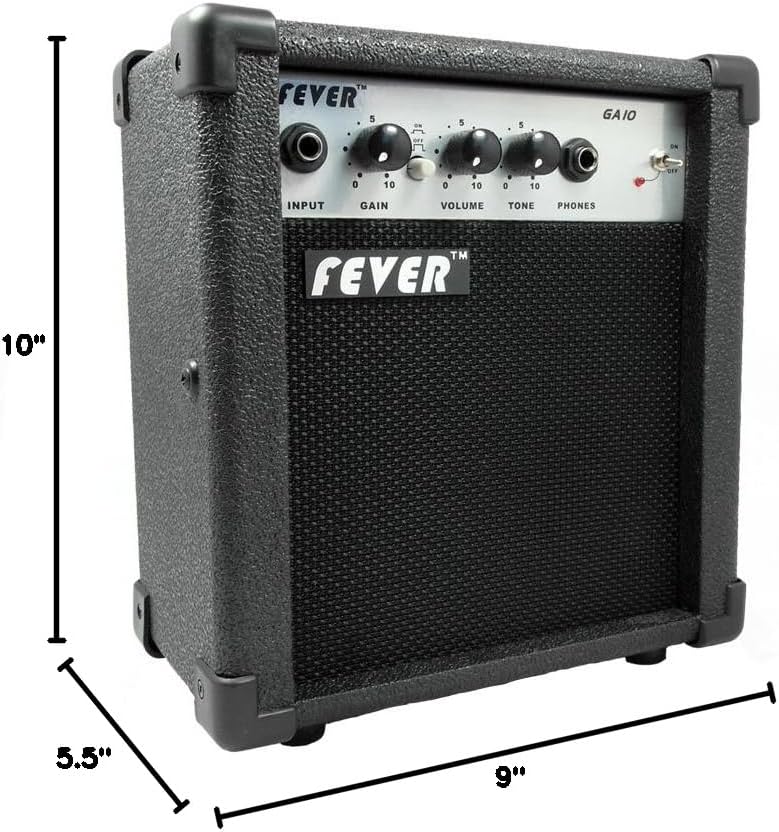
Kielelezo cha 4: Dimensions of the Fever GA-10 ampmaisha zaidi.
| Kipengele | Maelezo |
|---|---|
| Pato Wattage | 10 Watts |
| Vidhibiti | Gain, Volume, Tone |
| Swichi | Overdrive Distortion Switch (On/Off) |
| Ingizo | 1/4-inch Instrument Input |
| Matokeo | 1/4-inch Headphone Output |
| Chanzo cha Nguvu | Umeme wa Cord |
| Uzito wa Kipengee | Pauni 5.55 (kilo 2.52) |
| Vipimo vya Bidhaa (L x W x H) | Inchi 10 x 11.5 x 6.5 (sentimita 25.4 x 29.2 x 16.5) |
| Nyenzo | Plastiki |
| Rangi | Nyeusi |
Taarifa ya Udhamini
Fever products are manufactured to high-quality standards. This product is covered by a limited warranty against defects in materials and workmanship. Specific warranty terms and conditions may vary by region and retailer. Please retain your proof of purchase for warranty claims. For detailed warranty information, please refer to the documentation provided at the time of purchase or contact your retailer.
Usaidizi wa Wateja
If you encounter any issues not covered in this manual or require further assistance, please contact your retailer or the manufacturer's customer support. Have your product model number (GA-10) and proof of purchase ready when contacting support.