
1. Bidhaa Imeishaview
The SSV Works WP-UO4S is a high-definition Bluetooth 4-speaker overhead stereo system designed for various UTVs, including Can-Am Commander, Can-Am Maverick, Honda Big Red, and John Deere Gator models. This system provides clear stereo sound and is engineered for overhead mounting within your vehicle's stock cage. It features a built-in 50 watt x4 ultra-efficient digital amplifier, waterproof speakers, and an integrated AM/FM tuner with an internal FM antenna. The enclosure is constructed from fiberglass for durability and optimal sound quality, finished with a black texture coat to match vehicle interiors. The system includes a secure, watertight locker for mobile devices, complete with a slam latch polycarbonate door and bezel-mounted rubberized controls.

Picha 1: Mbele view of the SSV Works WP-UO4S overhead stereo system, showcasing the four speakers and central control unit.
2. Kuweka na Kuweka
The WP-UO4S system is designed for a straightforward installation process, typically completed within 15 minutes, requiring only a 2-wire hookup. All necessary wiring, stainless steel mounting hardware, and step-by-step instructions are included with the product.
2.1 Kuweka
The system is designed for overhead mounting to your vehicle's stock cage. Ensure the mounting location is secure and provides adequate clearance. The mounting type is versatile, supporting board mount, boat mount, and door mount configurations, depending on your specific UTV model and desired setup.
Wiring
Connect the two main power wires to your vehicle's 12V power source, following the included wiring diagram. An optional RCA low-level output is available for system expansion, which requires a separate WP-HRCA adapter.
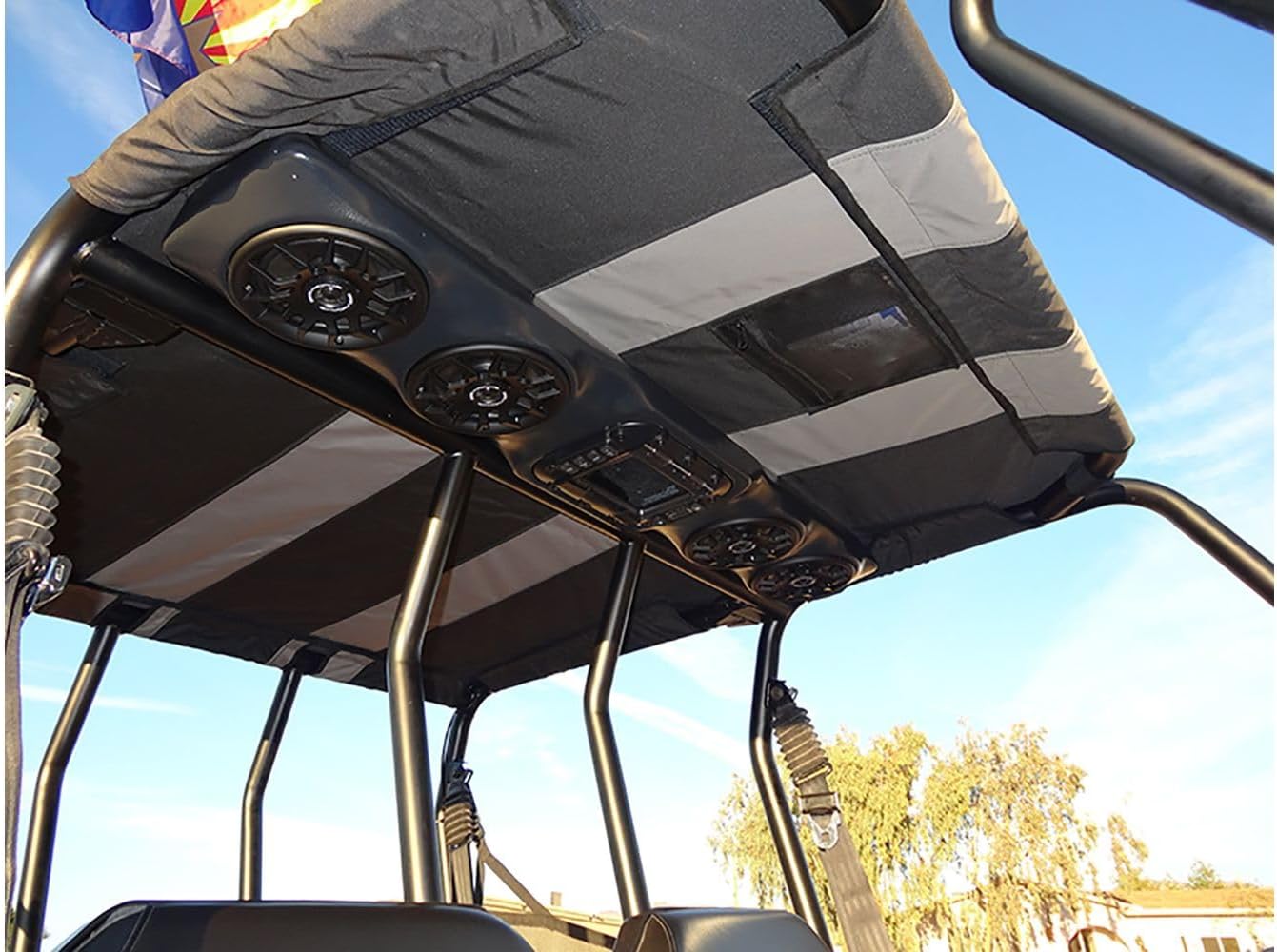
Image 2: The SSV Works WP-UO4S system installed overhead in a UTV, demonstrating its integrated fit.
3. Maagizo ya Uendeshaji
The WP-UO4S system offers multiple audio playback options and user-friendly controls.
3.1 Kuoanisha Bluetooth
- Ensure the WP-UO4S system is powered on.
- Activate Bluetooth on your mobile device (e.g., iPod, iPhone, smartphone).
- Tafuta available Bluetooth devices and select "SSV Works WP-UO4S" from the list.
- Once paired, your device will connect automatically in the future.
You can store your Bluetooth-enabled device securely in the 100% waterproof locker, which features a slam latch polycarbonate door.
3.2 AM/FM Kitafuta sauti
The system includes an integrated AM/FM tuner for local radio reception. Use the bezel-mounted rubberized controls to switch to radio mode, scan for stations, and adjust settings. The internal FM antenna provides reliable reception.
3.3 Vidhibiti
The system features bezel-mounted rubberized controls, offering both touch and button control methods for managing audio playback, volume, and source selection.

Picha 3: Karibu view of the central control panel on the SSV Works WP-UO4S, showing buttons and display.
4. Matengenezo
To ensure the longevity and optimal performance of your SSV Works WP-UO4S system, follow these maintenance guidelines:
- Kusafisha: Tumia laini, damp cloth to clean the exterior of the unit. Avoid abrasive cleaners or solvents that could damage the finish or waterproof seals.
- Waterproof Locker: Periodically check the seal of the waterproof locker to ensure it remains free of debris and is properly seated to maintain its watertight integrity.
- Viunganisho: Inspect all wiring connections periodically for corrosion or looseness, especially after exposure to harsh weather conditions.
- Fiberglass Enclosure: The durable fiberglass construction requires minimal maintenance. Avoid impacts that could crack or damage the enclosure.
5. Utatuzi wa shida
If you encounter issues with your WP-UO4S system, refer to the following common troubleshooting steps:
- Hakuna Nguvu: Check the 2-wire power connection to ensure it is securely attached to a functional 12V power source. Verify that the vehicle's battery is charged.
- Hakuna Sauti: Confirm that the volume is turned up on both the WP-UO4S system and your connected Bluetooth device. Ensure the correct audio source (Bluetooth or FM) is selected. Check speaker wire connections.
- Masuala ya Kuoanisha Bluetooth: Make sure the system is in Bluetooth pairing mode. Try unpairing and re-pairing your device. Ensure no other devices are currently connected to the system.
- Mapokezi Mabaya ya Redio: Ensure the internal FM antenna is not obstructed. In some areas, reception may be limited due to geographical factors.
- Sauti Iliyopotoka: Reduce the volume to see if distortion decreases. Check for loose speaker connections. Ensure the audio source is not overdriven.
If these steps do not resolve the issue, please contact SSV Works customer support for further assistance.
6. Vipimo
| Nambari ya Mfano | WP-UO4S |
| Chapa | SSV Hufanya kazi |
| Kiwango cha Juu cha Pato la Spika | 200 Watts |
| Idadi ya Vituo vya Sauti | 2.0 |
| Teknolojia ya Uunganisho | Bluetooth, RCA (optional expansion) |
| Teknolojia ya Wireless | Bluetooth |
| Njia ya Pato la Sauti | Stereo |
| Aina ya Spika | Marine speakers |
| Kiwango cha Upinzani wa Maji | Kuzuia maji |
| Njia ya Kudhibiti | Gusa, Kitufe |
| Chanzo cha Nguvu | Corded Electric (12V vehicle system) |
| Vifaa Sambamba | Simu mahiri |
| Aina ya Gari Inayolingana | UTV (Can-Am Commander, Maverick, Honda Big Red, John Deere Gator) |
| Vipimo vya Kipengee (D x W x H) | 8.75" x 40.5" x 4.25" |
| Uzito wa Kipengee | Pauni 26 |
| Rangi | Texture Coat Black |
| Vyombo vya Habari Vilivyojengwa | Speaker system, hardware, brackets, instructions |
7. Udhamini na Msaada
7.1 Taarifa ya Udhamini
The SSV Works WP-UO4S system comes with a Udhamini mdogo. Please refer to the warranty card included in your product packaging for specific terms, conditions, and duration of coverage. This warranty typically covers defects in materials and workmanship under normal use.
7.2 Usaidizi kwa Wateja
For technical assistance, warranty claims, or any questions regarding your SSV Works WP-UO4S system, please contact SSV Works customer support directly. Contact information can typically be found on the SSV Works official webtovuti au ndani ya ufungaji wa bidhaa.