
Utangulizi
This manual provides comprehensive instructions for the Superior Hotel TV Universal Programmable Remote Control, Model 8054242080070. This remote is specifically designed for hotel environments, featuring large buttons for ease of use and a disabled menu access button to prevent unauthorized changes to TV settings. It is programmable via PC for simple setup.
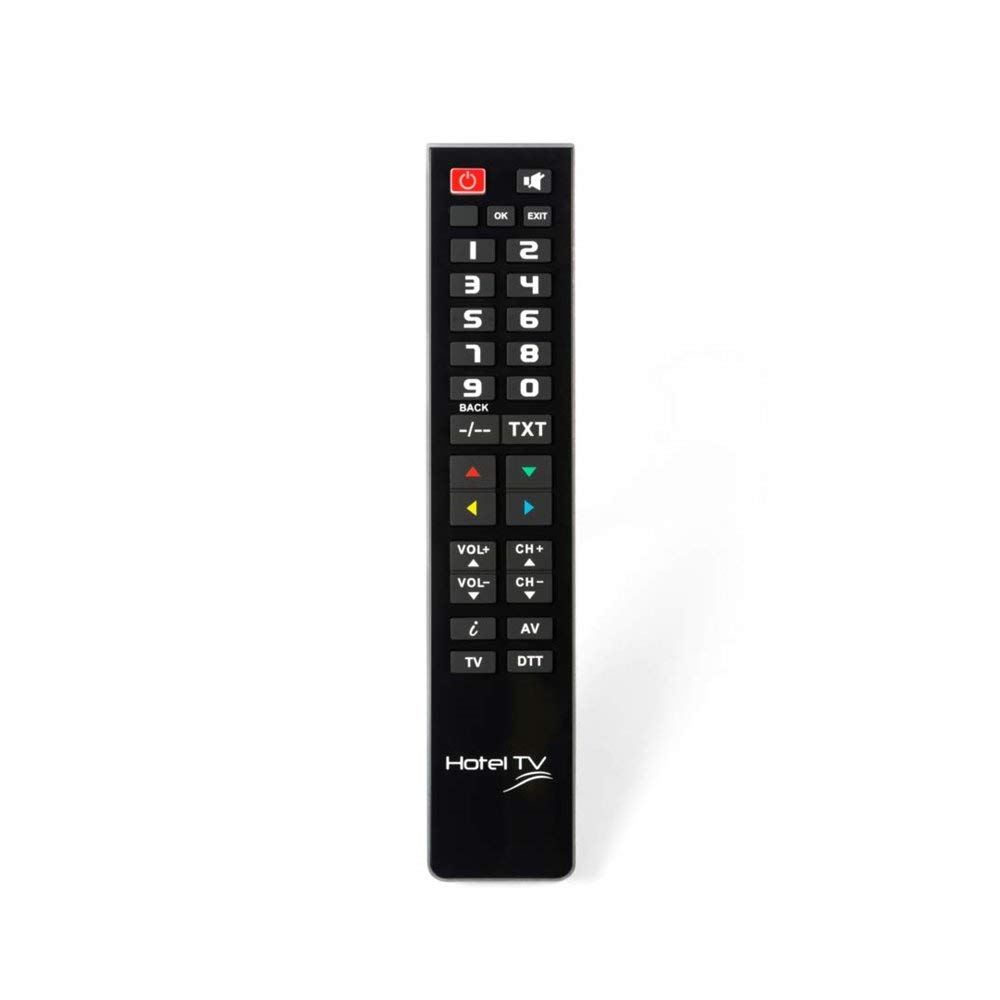
Image: Superior Hotel TV Universal Programmable Remote Control, showing its compact design and large buttons.
Sanidi
1. Ufungaji wa Betri
- Tafuta kifuniko cha sehemu ya betri nyuma ya kidhibiti cha mbali.
- Telezesha kifuniko kuelekea chini au bonyeza lachi ili kuifungua.
- Insert two AAA (LR03) batteries, ensuring the correct polarity (+ and -) as indicated inside the compartment. Kumbuka: Betri hazijajumuishwa.
- Badilisha kifuniko cha sehemu ya betri hadi ibofye kwa usalama mahali pake.
2. Upangaji wa Kompyuta
The remote control requires programming via a personal computer to function with your specific TV model. Follow these steps:
- Visit the official programming software webtovuti: www.telecontrol.tv.
- Download and install the programming software onto your PC.
- Connect the remote control to your PC using a compatible USB cable (not included).
- Follow the on-screen instructions within the software to select your TV brand and model, and program the remote control.
- Once programming is complete, disconnect the remote control from your PC.
Maagizo ya Uendeshaji
After successful programming, the remote control is ready for use. Its design focuses on essential functions for hotel guests.
- Kitufe cha Nguvu: Bonyeza kuwasha au kuzima TV.
- Kituo Juu/Chini: Use these buttons to change TV channels sequentially.
- Sauti Juu/Chini: Adjust the TV's audio volume.
- Kitufe cha kunyamazisha: Temporarily silence the TV audio.
- Vifungo vya Nambari (0-9): Chagua moja kwa moja vituo vya TV.
Kumbuka Muhimu: The menu access button is intentionally inactive on this remote control. This design prevents guests from altering TV settings, ensuring consistent operation within a hotel environment.
Matengenezo
Ubadilishaji wa Betri
When the remote control's performance degrades or it stops responding, replace the batteries. Follow the battery installation steps outlined in the "Setup" section. Always use new AAA (LR03) alkaline batteries.
Kusafisha
Ili kusafisha udhibiti wa kijijini, uifuta kwa upole uso wake na kitambaa laini, kavu. Kwa uchafu mkaidi, kidogo dampen the cloth with water or a mild, non-abrasive cleaner. Avoid using harsh chemicals or submerging the remote in liquid.
Kutatua matatizo
- Kidhibiti cha mbali hakijibu:
- Angalia kama betri zimeingizwa kwa usahihi na zina chaji ya kutosha. Badilisha ikiwa ni lazima.
- Hakikisha hakuna vizuizi kati ya kidhibiti cha mbali na kipokezi cha infrared cha TV.
- Verify that the remote was programmed correctly for your TV model using the PC software.
- Vifungo haifanyi kazi:
- Some buttons, like the menu button, are intentionally disabled for hotel use.
- If essential buttons are not working, re-program the remote control via PC.
- Clean the remote control to ensure no debris is interfering with button presses.
- Masuala ya programu:
- Ensure your PC meets the minimum requirements for the programming software.
- Use a reliable USB cable for connection.
- Refer to the software's help section or the telecontrol.tv website for specific programming guidance.
Vipimo
| Chapa | Elektroniki Bora |
| Nambari ya Mfano | 8054242080070 |
| Vifaa Sambamba | Televisheni |
| Teknolojia ya Uunganisho | Mzunguko wa Redio (RF) |
| Kipengele Maalum | Pre-programmed (via PC) |
| Vifaa vya Juu Vinavyotumika | 1 |
| Idadi ya Vifungo | 1 (referring to the main function set, not individual keys) |
| Masafa ya Juu | Mita 10 |
| Maelezo ya Betri | AAA (LR03) |
| UPC / EAN | 08054242080070 |
Udhamini na Msaada
Taarifa ya Udhamini
Specific warranty details for the Superior Hotel TV Universal Programmable Remote Control are not provided in this manual. Please refer to your purchase documentation or contact your vendor for warranty terms and conditions.
Msaada wa Kiufundi
For technical assistance, programming software, and additional information, please visit the official webtovuti: