
Utangulizi
This manual provides essential instructions for the safe and effective use of your Fujifilm FinePix HS50EXR digital camera. Please read this manual thoroughly before using the camera and keep it in a safe place for future reference.

Kielelezo 1: Mbele view of the Fujifilm FinePix HS50EXR Digital Camera, showcasing lenzi yake na muundo wa mwili.
Sanidi
1. Kufungua na Ukaguzi wa Awali
Ondoa kwa uangalifu vitu vyote kutoka kwa kifurushi. Hakikisha vipengele vifuatavyo vipo:
- Fujifilm FinePix HS50EXR Digital Camera body
- Chaji inayoweza kuchajiwa ya Li-ion
- Chaja ya Betri
- Kamba ya Mabega
- Kebo ya USB
- Cap Lens
- CD-ROM (containing software and full manual)
2. Kuchaji Betri
Before first use, fully charge the supplied rechargeable Li-ion battery. Insert the battery into the charger and connect the charger to a power outlet. The charging indicator will show the charging status and turn off when charging is complete.
3. Inserting Battery and Memory Card
- Fungua kifuniko cha sehemu ya betri/kadi ya kumbukumbu chini ya kamera.
- Ingiza betri iliyochajiwa kwa uelekeo sahihi hadi ibofye mahali pake.
- Insert a compatible SD or microSD memory card (sold separately) into the card slot until it clicks. Ensure the card is facing the correct direction.
- Funga kifuniko cha compartment kwa usalama.
4. Kuunganisha Kamba ya Mabega
Thread the shoulder strap through the strap lugs on the camera body as illustrated in the full manual on the CD-ROM. Ensure it is securely fastened to prevent accidental drops.
Kuendesha Kamera
1. Washa/Zima
To power on the camera, slide the power switch located on the top of the camera. To power off, slide the switch again.
2. Njia za Msingi za Risasi
Njia ya kupiga simu juu ya kamera hukuruhusu kuchagua njia tofauti za upigaji risasi:
- Otomatiki: Kwa upigaji picha otomatiki kikamilifu, ambapo kamera huchagua mipangilio bora.
- P (Programu AE): The camera sets aperture and shutter speed for optimal exposure, while you can adjust other settings.
- A (Aperture Priority AE): You set the aperture, and the camera automatically adjusts the shutter speed.
- S (Shutter Priority AE): You set the shutter speed, and the camera automatically adjusts the aperture.
- M (Mwongozo): Unadhibiti uwazi na kasi ya kufunga kwa udhibiti kamili wa ubunifu.
- EXR: Utilizes the EXR CMOS II sensor's capabilities for enhanced image quality in various conditions.
- ENEO: Select from various scene presets (e.g., Portrait, Landscape, Sport) for specific shooting situations.
3. Uendeshaji wa Kuza
The FinePix HS50EXR features a manual Fujinon 42x optical zoom lens (24-1000mm equivalent). Rotate the zoom barrel on the lens directly to adjust the focal length. This manual control provides precise and intuitive zooming.
4. Kuzingatia
The camera employs an Intelligent Hybrid AF system, combining high-speed phase detection AF and contrast AF for rapid and accurate focusing. You can also switch to manual focus by rotating the focus ring on the lens.
- Single AF (AF-S): Focuses when the shutter button is pressed halfway.
- AF Endelevu (AF-C): Continuously adjusts focus for moving subjects.
- Mkazo wa Mwongozo (MF): Rotate the focus ring on the lens to adjust focus manually.
5. Uimarishaji wa Picha
The camera features lens shift optical image stabilization to reduce blur caused by camera shake, especially when shooting at longer focal lengths or in low light conditions.
6. LCD and Viewmpataji
The camera is equipped with a 3.0-inch Vari-angle LCD screen (920K-dot) that can be rotated and tilted for flexible shooting angles. It also has a high-resolution electronic viewfinder (EVF) with an eye sensor, which automatically switches between the LCD and EVF when you bring your eye to the viewmpataji.
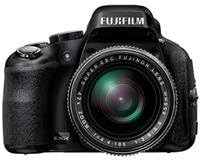
Kielelezo 2: Upande view of the Fujifilm FinePix HS50EXR Digital Camera, showing the vari-angle LCD screen extended for flexible viewing.
7. Kurekodi Video
To record movies, set the mode dial to the movie icon. The camera supports Full HD (1080p) video recording at 60 frames per second (60fps) with continuous phase detection autofocus.
8. Risasi endelevu
The FinePix HS50EXR can capture images at up to 11 frames per second (fps) in full resolution, allowing you to capture fast-moving action.
9. Matumizi ya Mweko
The camera has a built-in flash. Press the flash button to pop it up. Various flash modes (e.g., Auto, Fill-in, Slow Sync) can be selected via the menu.
10. Muunganisho
The camera supports HDMI and USB connectivity for transferring images and videos to a computer or displaying them on a TV. It also features Wi-Fi for wireless image transfer and remote control via a compatible smartphone app.
Matengenezo
1. Kusafisha Kamera
- Lenzi: Use a soft, lint-free cloth or a lens brush to gently remove dust. For stubborn smudges, use a lens cleaning solution applied to a cloth, not directly to the lens.
- Mwili: Wipe the camera body with a soft, dry cloth. For heavy dirt, use a cloth lightly dampened na maji, kisha kuifuta kavu. Epuka kutumia vimumunyisho vya kikaboni.
- Skrini ya LCD: Tumia kitambaa laini na kikavu. Epuka kubonyeza kwa nguvu kwenye skrini.
2. Utunzaji wa Betri
- Daima tumia betri na chaja halisi ya Fujifilm.
- Hifadhi betri mahali pa baridi, kavu wakati haitumiki.
- Usiweke betri kwenye joto kali au jua moja kwa moja.
3. Hifadhi
When storing the camera for extended periods, remove the battery and memory card. Store the camera in a dry, well-ventilated area, away from dust and direct sunlight. Use a desiccant if storing in a humid environment.
Kutatua matatizo
Ukikumbana na matatizo na kamera yako, rejelea matatizo na masuluhisho yafuatayo:
| Tatizo | Sababu / Suluhisho linalowezekana |
|---|---|
| Kamera haiwashi. | Betri imeisha au imeingizwa vibaya. Hakikisha betri imechajiwa na kuingizwa ipasavyo. |
| Picha ni ukungu. | Camera shake: Use image stabilization, a faster shutter speed, or a tripod. Incorrect focus: Ensure the camera is properly focused on the subject. |
| Flash haina moto. | Flash is closed or disabled. Pop up the flash and check flash settings in the menu. |
| Hitilafu ya kadi ya kumbukumbu. | Card is full, damaged, or incorrectly inserted. Try reinserting the card, using a different card, or formatting the card (this will erase all data). |
| Betri huisha haraka. | Frequent use of LCD, flash, or video recording. Reduce usage or carry a spare charged battery. |
For more detailed troubleshooting, refer to the full instruction manual on the supplied CD-ROM.
Vipimo
| Kipengele | Maelezo |
|---|---|
| Aina ya Sensor | 1/2-inch 16 MP BSI-CMOS |
| Lenzi | Fujinon 42x Optical Zoom (24-1000mm equivalent), f/2.8-f/11 aperture |
| Uimarishaji wa Picha | Macho |
| Skrini ya LCD | 3.0-inch Vari-angle, 920K-dot |
| Viewmpataji | Electronic (EVF), 920K-dot, with eye sensor |
| Azimio la Video | HD Kamili 1080p katika 60fps |
| File Miundo | JPEG (Exif Ver 2.3), RAW (RAF format), RAW+JPEG |
| Kasi ya Kufunga | Sekunde 30 hadi sekunde 1/4000 |
| Udhibiti wa Mfiduo | Program AE, Shutter Priority AE, Aperture Priority AE, Manual |
| Mfumo wa Kuzingatia | Intelligent Hybrid AF (Phase Detection, Contrast AF), Manual Focus |
| Muunganisho | HDMI, USB, Wi-Fi |
| Vyombo vya Habari vya Uhifadhi | SD, microSD (UHS-I compatible) |
| Uzito | Takriban. Pauni 2.3 (kilo 1.04) |
Taarifa ya Udhamini
Your Fujifilm FinePix HS50EXR Digital Camera comes with a manufacturer's warranty. Please refer to the warranty card included in your product packaging or visit the official Fujifilm webtovuti kwa sheria na masharti ya kina kuhusu huduma na udhamini.
Msaada
For further assistance, technical support, or to download the full instruction manual and software updates, please visit the official Fujifilm support webtovuti:
You may also contact Fujifilm customer service directly through the contact information provided on their webtovuti.