
1. Utangulizi
This manual provides detailed instructions for the setup, operation, and maintenance of your Rii Mini i8 2.4GHz Wireless Keyboard with Touchpad. This device combines a full QWERTY keyboard with a multi-touch touchpad, designed for convenient control of various devices such as PCs, Smart TVs, Android TV Boxes, and game consoles.

Picha: Mwenye pembe view of the Rii Mini i8 Wireless Keyboard, showcasinmuundo wake mdogo na mpangilio wa funguo.
2. Yaliyomo kwenye Kifurushi
Tafadhali angalia yaliyomo kwenye kifurushi ili kuhakikisha kuwa bidhaa zote zipo:
- Rii Mini i8 Wireless Keyboard with Touchpad
- Kipokezi cha USB (kilichohifadhiwa ndani ya sehemu ya betri)
- Kebo ya Kuchaji ya USB
- Mwongozo wa Mtumiaji (hati hii)
3. Kuweka
- Tafuta Kipokeaji cha USB: Open the battery compartment cover on the back of the keyboard. The USB receiver is stored inside.
- Ingiza Kipokezi cha USB: Plug the USB receiver into an available USB port on your device (PC, Smart TV, Android TV Box, etc.).
- Washa Kibodi: Locate the ON/OFF switch on the side of the keyboard and slide it to the "ON" position.
- Muunganisho wa Kiotomatiki: Kibodi inapaswa kuunganishwa kiotomatiki kwenye kifaa chako. Kwa kawaida hakuna viendeshi vya ziada vinavyohitajika.

Picha: Nyuma view of the Rii Mini i8 keyboard, showing the battery compartment and the USB receiver stored within.

Picha: Nyuma view of the Rii Mini i8 keyboard with the battery cover open, illustrating the location of the removable USB receiver.
4. Maagizo ya Uendeshaji
Once connected, the Rii Mini i8 functions as a standard keyboard and mouse.
- Kuandika: Use the QWERTY keyboard layout for text input.
- Kipengele cha Panya: The central touchpad allows for cursor control.
- Vifunguo vya Multimedia: Dedicated keys for volume control, play/pause, and other media functions are located on the left side.
- Funguo za Utendakazi (Fn): Bonyeza na ushikilie Fn key (bottom left) and then press a key with a blue icon to access its secondary function (e.g., Fn + F1 for email).

Image: A user holding the Rii Mini i8 keyboard, demonstrating its use for controlling a television display.
5. Mpangilio na Kazi za Kibodi
The Rii Mini i8 features a compact QWERTY layout with additional function and multimedia keys.

Picha: Juu-chini view of the Rii Mini i8 Wireless Keyboard, clearly showing the full QWERTY layout, touchpad, and dedicated function keys.
- QWERTY Keys: Standard alphanumeric keys for typing.
- Vifunguo vya Utendakazi (F1-F12): Imefikiwa kwa kubonyeza Fn + corresponding key.
- Multimedia Control Keys: Volume up/down, mute, play/pause, next/previous track.
- Pedi ya Mwelekeo: Iko upande wa kulia kwa ajili ya urambazaji.
- Left/Right Mouse Buttons: Dedicated buttons below the touchpad.
6. Kazi za Touchpad
The integrated touchpad supports multi-touch gestures for intuitive navigation.
- Bomba moja la kidole: Hufanya kazi kama kubofya kwa kipanya kushoto.
- Kugusa kwa vidole viwili: Functions as a right mouse click.
- Two Finger Drag (Vertical): Scrolls up or down.
- Kuburuta kwa Kidole Kimoja: Husogeza mshale.
7. Kuchaji Kifaa
The Rii Mini i8 keyboard is powered by a rechargeable Lithium Metal battery.
- Unganisha Kebo ya Kuchaji: Plug the small end of the included USB charging cable into the mini-USB port on the top edge of the keyboard.
- Unganisha kwenye Chanzo cha Umeme: Plug the standard USB end of the cable into a USB port on your computer, a USB wall adapter, or a power bank.
- Kiashiria cha Kuchaji: A charging indicator light (usually red) will illuminate during charging and turn off or change color when fully charged.
- Maisha ya Betri: The keyboard is designed for extended use on a single charge.

Image: The included USB charging cable, showing the mini-USB connector for the keyboard and the standard USB connector for a power source.
8. Matengenezo
- Kusafisha: Use a soft, dry cloth to clean the surface of the keyboard. For stubborn dirt, a slightly damp kitambaa kinaweza kutumika, kuhakikisha hakuna kioevu kinachoingia kwenye kifaa.
- Hifadhi: Ikiwa haitumiki kwa muda mrefu, zima kibodi ili kuokoa muda wa matumizi ya betri. Hifadhi mahali pakavu na penye baridi.
- Utunzaji wa Betri: Avoid fully discharging the battery frequently. Charge the device regularly to maintain battery health.
9. Utatuzi wa shida
| Tatizo | Suluhisho linalowezekana |
|---|---|
| Kibodi haijibu |
|
| Usogeaji wa mshale ni wa kusuasua au polepole |
|
| Funguo hazifanyi kazi |
|
10. Vipimo
Key technical specifications for the Rii Mini i8 Wireless Keyboard:
- Mfano: RT-MWK08RF
- Muunganisho: 2.4GHz Isiyo na Waya (kupitia USB Dongle)
- Kiolesura cha maunzi: Frequency ya Redio
- Uendeshaji Voltage: 3.3 Volts
- Chanzo cha Nguvu: Battery Powered (Lithium Metal, included)
- Vipimo vya Bidhaa: 5.79 x 0.75 x 3.86 sentimita (takriban 147 x 18 x 97 mm)
- Uzito wa Kipengee: 110 g
- Vipengele Maalum: Isiyo na waya, Touchpad
- Teknolojia ya kugundua harakati: Optical (for touchpad)
- Maelezo ya Kibodi: Ndani
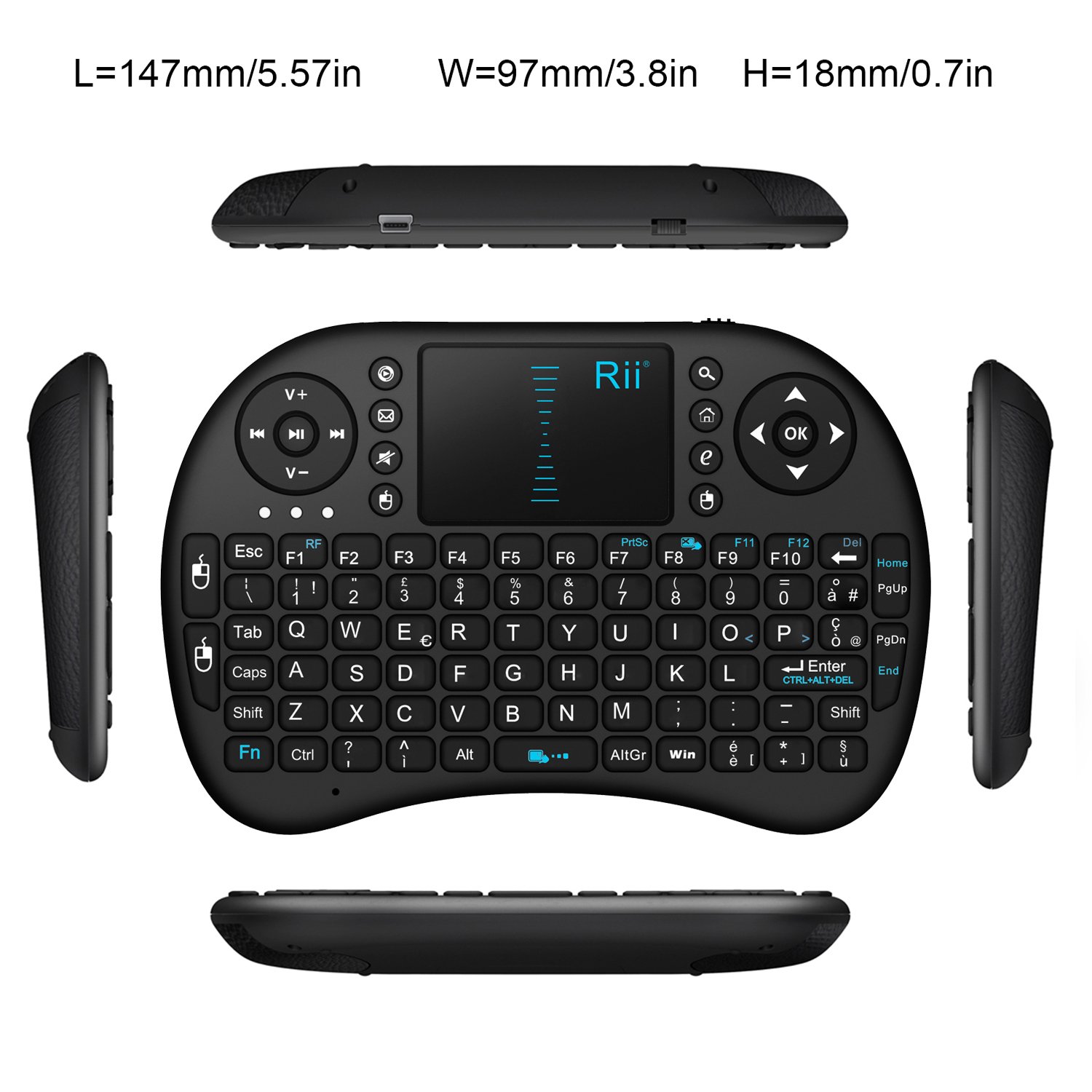
Picha: Juu-chini view of the Rii Mini i8 keyboard with its dimensions (length, width, height) indicated in millimeters and inches.
11. Udhamini na Msaada
Kwa maelezo ya udhamini na usaidizi wa kiufundi, tafadhali rejelea afisa wa mtengenezaji webtovuti au wasiliana na muuzaji wako. Weka risiti yako ya ununuzi kwa madai ya udhamini.