
Utangulizi
This manual provides essential instructions for the installation, operation, maintenance, and troubleshooting of the IBM 49P1599 FRU System Board. This system board is designed for personal computers, featuring a 400/533 Front Side Bus, integrated 10/100 Ethernet, and support for DDR2 memory.
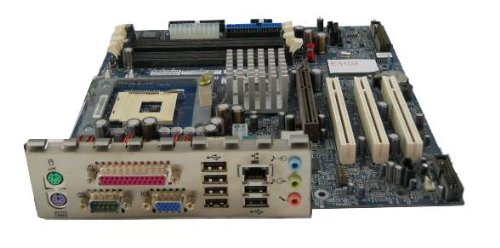
Image: The IBM 49P1599 FRU System Board. This image displays the main components and layout of the motherboard, including CPU socket, memory slots, and various connectors.
Kuweka na Kuweka
Careful installation is crucial for the proper functioning of your system board. Always handle the board by its edges to avoid static discharge.
1. Kujiandaa kwa Ufungaji
- Ensure your computer case is compatible with the system board's form factor.
- Kusanya vifaa muhimu: bisibisi ya kichwa cha Phillips, kamba ya kifundo cha mkono isiyotulia.
- Unplug the power supply from the wall outlet before beginning.
2. Installing the System Board
- Sakinisha ngao ya I/O kwenye sehemu ya nyuma ya kisahani cha kompyuta yako.
- Carefully align the system board with the standoffs in the case.
- Secure the system board with screws, ensuring it is firmly seated.
3. Kuweka Vipengele
Kichakataji (CPU)
This system board is supplied without a processor. Refer to your CPU's manual for specific installation instructions. Ensure the CPU is correctly oriented in the socket before securing the retention lever.
Kumbukumbu (RAM)
The board supports DDR2 RAM and has 2 memory slots.
- Fungua klipu katika ncha zote mbili za nafasi ya kumbukumbu.
- Pangilia moduli ya kumbukumbu na yanayopangwa, kuhakikisha notch kwenye moduli inalingana na ufunguo katika slot.
- Bonyeza kwa nguvu kwenye ncha zote mbili za moduli hadi klipu zitakapoingia mahali pake.
Kadi ya Picha
The system board features an Integrated Graphics Card Interface and a PCI-Express x16 slot for dedicated graphics cards.
- Locate the PCI-Express x16 slot.
- Remove the corresponding expansion slot cover from your case.
- Insert the graphics card firmly into the slot until it clicks. Secure it with a screw to the case.
4. Kuunganisha Cables
- Viunganishi vya Nguvu: Connect the main 24-pin ATX power connector and the 4-pin CPU power connector from your power supply to the system board.
- Vifaa vya SATA: Connect SATA 3 data cables from your storage devices (hard drives, SSDs) to the SATA ports on the system board.
- Viunganishi vya Paneli ya Mbele: Connect the power button, reset button, HDD LED, power LED, and USB ports from your case to the corresponding headers on the system board. Refer to the board's silkscreen labels for correct orientation.
- Ethaneti: The board has integrated 10/100 Ethernet. Connect your network cable to the RJ-45 port on the I/O panel.
Maagizo ya Uendeshaji
After completing the physical installation, you can proceed with the initial boot and operating system setup.
1. Uzinduzi wa Awali
- Hakikisha vipengele vyote vimeunganishwa kwa usalama.
- Connect your monitor, keyboard, and mouse.
- Plug in the power supply and turn on the system.
- The system should power on, and you should see a display on your monitor.
2. Kuweka BIOS/UEFI
During the initial boot sequence, press the designated key (commonly DEL, F2, F10, or F12) to enter the BIOS/UEFI setup utility. Here you can configure boot order, system time, and other hardware settings. Save changes before exiting.
3. Ufungaji wa Mfumo wa Uendeshaji
This system board is compatible with platforms such as Windows 10. Insert your operating system installation media (USB drive or DVD) and follow the on-screen prompts to install the operating system. Ensure all necessary drivers for the system board components are installed after the OS installation.
Matengenezo
Regular maintenance helps ensure the longevity and stable performance of your system board.
- Kusafisha: Periodically clean dust from the system board and components using compressed air. Ensure the system is powered off and unplugged before cleaning.
- Sasisho za BIOS: Check the official IBM support website for BIOS updates. BIOS updates can improve compatibility, stability, and performance. Follow the provided instructions carefully when updating the BIOS.
- Ukaguzi wa vipengele: Ensure all cables and components remain securely connected.
Kutatua matatizo
Ukikumbana na matatizo, rejelea hatua zifuatazo za kawaida za utatuzi:
Hakuna Nguvu
- Verify the power supply is connected to the wall outlet and turned on.
- Check that the 24-pin and 4-pin power connectors are securely attached to the system board.
- Ensure the front panel power button cable is correctly connected to the system board header.
Hakuna Onyesho
- Confirm the monitor is powered on and connected to the correct video output (either integrated or dedicated graphics card).
- Reseat the graphics card (if applicable) and memory modules.
- Jaribu kwa kutumia kifuatiliaji tofauti au kebo ya video ikiwezekana.
Mfumo Unashindwa Kuwaka
- Angalia nyaya au vipengele vilivyolegea.
- Ensure the CPU is properly seated and its cooler is installed correctly.
- Try booting with only one memory module installed, rotating through the modules and slots to identify a faulty one.
- Reset the BIOS to default settings (refer to your system board's specific instructions for clearing CMOS).
Vipimo
Udhamini na Msaada
For warranty information and technical support, please refer to the official IBM website or contact your point of purchase. Keep your proof of purchase for warranty claims. IBM provides resources and support for its products to ensure customer satisfaction.
Kwa msaada zaidi, tembelea Msaada wa IBM webtovuti.
Ask a question about this manual
Ask about setup, troubleshooting, compatibility, parts, safety, or missing instructions. Manuals+ will review the question and use this page’s manual context to help answer it.
Posting as .
| Kipengele | Vipimo |
|---|---|
| Nambari ya Mfano | 49P1599 FRU |
| Basi la Upande wa Mbele (FSB) | 400/533 MHz |
| Teknolojia ya Kumbukumbu ya RAM | DDR2 |
| Kasi ya Saa ya Kumbukumbu | 2133 MHz |
| Kumbukumbu Slots Inapatikana | 2 |
| Kiolesura cha Kadi ya Michoro | Integrated, PCI-Express x16 |
| Kiwango cha Basi la Mfumo Kinachoungwa Mkono | SATA 3 |
| Integrated Ethernet | 10/100 Mbps |
| Vifaa Sambamba | Kompyuta ya kibinafsi |
| Utangamano wa Jukwaa | Windows 10 |
| Uzito wa Kipengee | Pauni 8 |