
1. Zaidiview
The Canon PowerShot SD450 Digital ELPH camera is a compact digital camera designed for ease of use and high-quality imaging. It features a 5.0-megapixel sensor, a 3x optical zoom lens, and a 2.5-inch LCD display. The camera incorporates Canon's DIGIC II processor for efficient image processing and offers various shooting modes to suit different photographic situations.

Kielelezo 1.1: Mbele view of the Canon PowerShot SD450 Digital ELPH camera with its lens retracted.
2. Ni nini kwenye Sanduku
Thibitisha kuwa vitu vyote vifuatavyo vimejumuishwa kwenye kifurushi chako:
- PowerShot SD450 body
- Pakiti ya betri ya Lithiamu NB-4L
- Battery charger CB-2LV
- 16 MB SD memory card SDC-16M
- Kamba ya mkono WS-600
- CD-ROM ya Suluhisho la Kamera ya Dijiti
- Kebo ya kiolesura cha USB IFC-400PCU
- Audio-video cable AVC-DC300
3. Kuweka
3.1. Kuchaji Betri
- Insert the Lithium battery pack NB-4L into the battery charger CB-2LV.
- Chomeka chaja kwenye soketi ya umeme. Taa ya kiashiria cha kuchaji itawaka.
- Once charging is complete, the indicator light will change or turn off. Remove the battery.
3.2. Kuingiza Betri na Kadi ya SD
- Fungua kifuniko cha sehemu ya betri/kadi kilicho chini ya kamera.
- Insert the charged battery pack into the compartment, ensuring correct orientation.
- Insert the SD memory card into the card slot until it clicks into place.
- Funga kifuniko cha compartment kwa usalama.
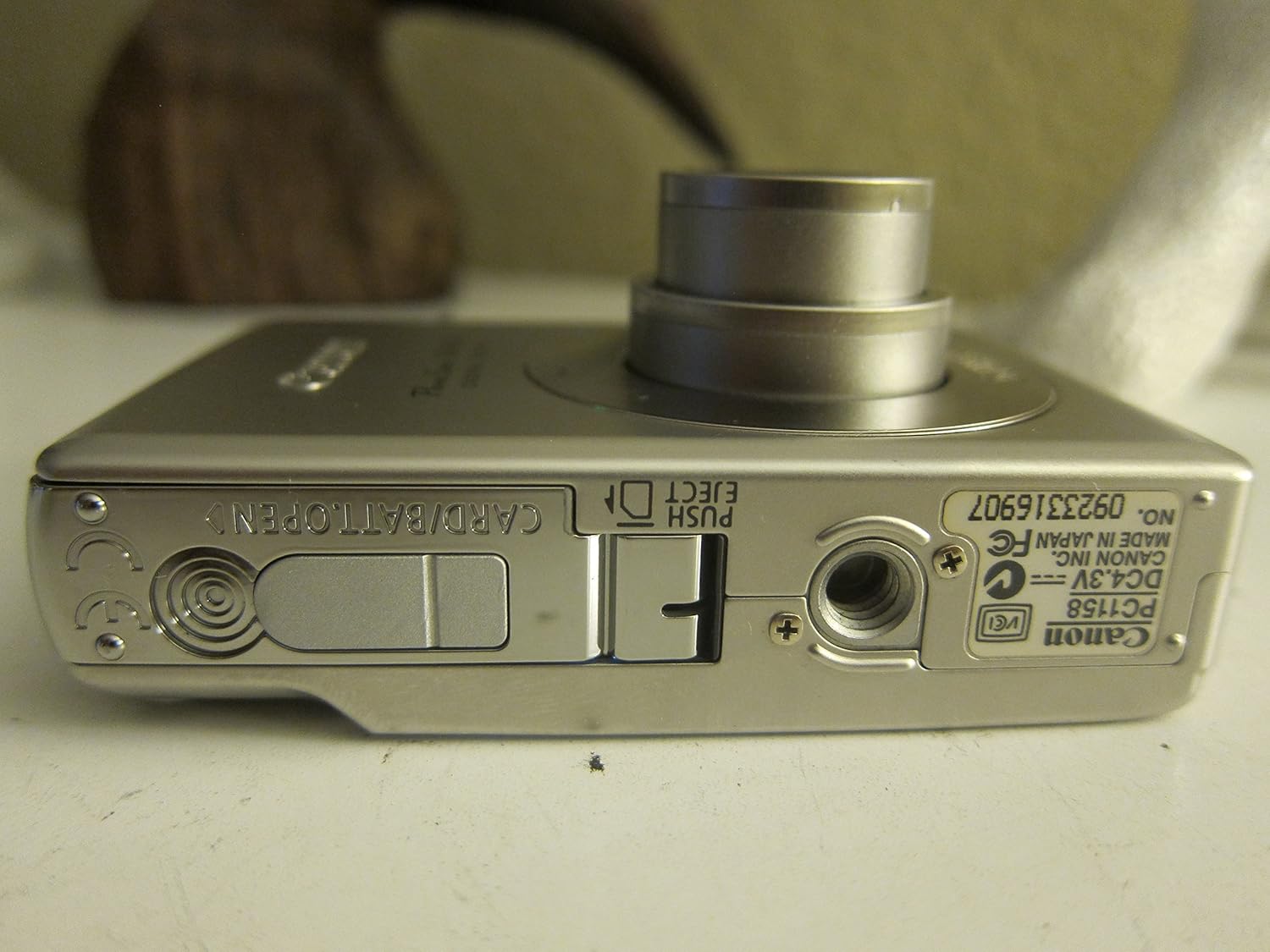
Kielelezo 3.1: Chini view of the camera, illustrating the battery and SD card compartment.
3.3. Umeme wa Awali na Mipangilio ya Msingi
- Bonyeza kwa WASHA/ZIMWA kifungo kwa nguvu kwenye kamera.
- Fuata maelekezo kwenye skrini ili kuweka tarehe, saa, na lugha.

Kielelezo 3.2: Juu view of the camera, highlighting the power button and shutter release.
4. Kuendesha Kamera
4.1. Upigaji picha wa Msingi
- Washa/Zima: Bonyeza kwa WASHA/ZIMWA kitufe.
- Kupiga Picha: Bonyeza kitufe cha kufunga katikati ili kuzingatia, kisha bonyeza kikamilifu ili kunasa picha.
- Kuza: Tumia lever ya kukuza kuzunguka kitufe cha shutter ili kurekebisha zoom ya macho ya 3x.

Kielelezo 4.1: Mbele view of the camera with the optical zoom lens extended.
4.2. Njia za Risasi
The PowerShot SD450 offers various shooting modes to optimize settings for different scenes. Rotate the mode dial to select:
- Otomatiki: Camera automatically sets optimal exposure and focus.
- Mwongozo: Allows for more control over settings like white balance and color tones (black and white, sepia, vivid, neutral).
- Picha: Hutia ukungu mandharinyuma ili kusisitiza mada.
- Mandhari: Ensures sharp focus on distant subjects.
- Picha ya Usiku: For shooting in low light conditions.
- Njia za Onyesho: Includes specific settings for Kids & Pets, Foliage, Fireworks, Snow, Underwater, Beach, and Indoor.
- Rangi Zangu: Apply special effects like Color Swap or Custom Color directly in-camera.
4.3. Kuzingatia na Kufichua
- AiAF: The 9-point Artificial Intelligence Auto Focus system automatically focuses on subjects, even if off-center.
- Udhibiti wa Mfiduo: Select from Evaluative, Center-weighted, or Spot metering.
- Usikivu wa ISO: Adjustable to Auto, 50, 100, 200, or 400 to control light sensitivity.
4.4. Kurekodi Video
The camera can record high-quality movies:
- Maazimio: VGA (640x480) or QVGA (320x240) at 30 or 15 frames per second.
- Hali ya Filamu ya Kasi ya Fremu: Records at 60 frames per second for slow-motion playback.
- Compact Movie Mode (QQVGA): 160x120 at 15 frames per second, suitable for email sharing.
- Continuous filming is available until the file size reaches 1 GB or 60 minutes.
4.5. Uchezaji na Urejeleajiview
Kufanya upyaview picha na video zako:
- Bonyeza kwa Uchezaji kitufe.
- Use the directional pad to navigate through images and videos.
- Intelligent Orientation Sensor: Automatically rotates stored images for correct playback when the camera is rotated.
- Slideshow Functions: Create impressive slideshows with transition effects directly on the camera.

Kielelezo cha 4.2: Nyuma view of the camera, showing the LCD display during image playback.
4.6. Kuchapisha Picha
The PowerShot SD450 supports direct printing:
- PictBridge: Connect directly to PictBridge-compatible printers (e.g., Canon PIXMA printers) for printing without a PC.
- Kitufe cha Kuchapisha/Kushiriki: Simplifies direct printing and image uploading to Windows XP or Mac OS X.
5. Matengenezo
5.1. Kusafisha Kamera
- Tumia kitambaa laini na kikavu kusafisha mwili wa kamera.
- For the lens and LCD screen, use a lens cleaning cloth and specialized cleaning solution if necessary. Avoid harsh chemicals.
5.2. Utunzaji wa Betri
- Hifadhi betri mahali pa baridi, kavu wakati haitumiki.
- Epuka kutoa betri kikamilifu mara kwa mara ili kuongeza muda wake wa kuishi.
- Recharge the battery using only the provided Canon charger.
5.3. Hifadhi
- When storing the camera for extended periods, remove the battery.
- Store the camera in a protective case to prevent dust and scratches.
6. Utatuzi wa shida
| Tatizo | Suluhisho |
|---|---|
| "Memory Error" message appears. |
|
| Picha ni ukungu. |
|
| Flash is too strong or washes out subjects. |
|
| Betri huisha haraka. |
|
| Kamera haiwashi. |
|
7. Vipimo
| Chapa | Kanuni |
| Jina la Mfano | Canon PowerShot SD450 |
| Ufanisi Bado Azimio | 5 Megapixels |
| Kuza macho | 3x |
| Ukubwa wa skrini | Inchi 2.5 |
| Uimarishaji wa Picha | Digital, Optical |
| Masafa ya ISO | Kiotomatiki, 50, 100, 200, 400 |
| Kasi ndogo ya Shutter | Sekunde 15 |
| Kasi ya Juu ya Kufunga | Sekunde 1/1500 |
| Azimio la Kukamata Video | SD VGA 480p |
| Umbizo la Kukamata Video | AVI |
| File Umbizo | JPEG, MBICHI |
| Vipimo (L x W x H) | Inchi 3.39 x 0.87 x 2.13 |
| Uzito wa Kipengee | 5.44 wakia |
| Rangi | Fedha |
| Ina Self-Timer | Ndiyo |
| Kiwango cha Upinzani wa Maji | Sio Sugu ya Maji |
8. Udhamini na Msaada
For detailed warranty information, please refer to the warranty card included with your product or visit the official Canon website. The camera comes bundled with Canon software (ZoomBrowser EX 5.5, PhotoRecord 2.2, ImageBrowser 5.5, PhotoStitch 3.1, Movie Edit Task) for image management and editing. Purchasers are also eligible for membership to Canon iMAGE Gateway for additional support and services.
For technical support, driver downloads, or service inquiries, please visit the official Canon support webtovuti au wasiliana na huduma kwa wateja wa Canon.